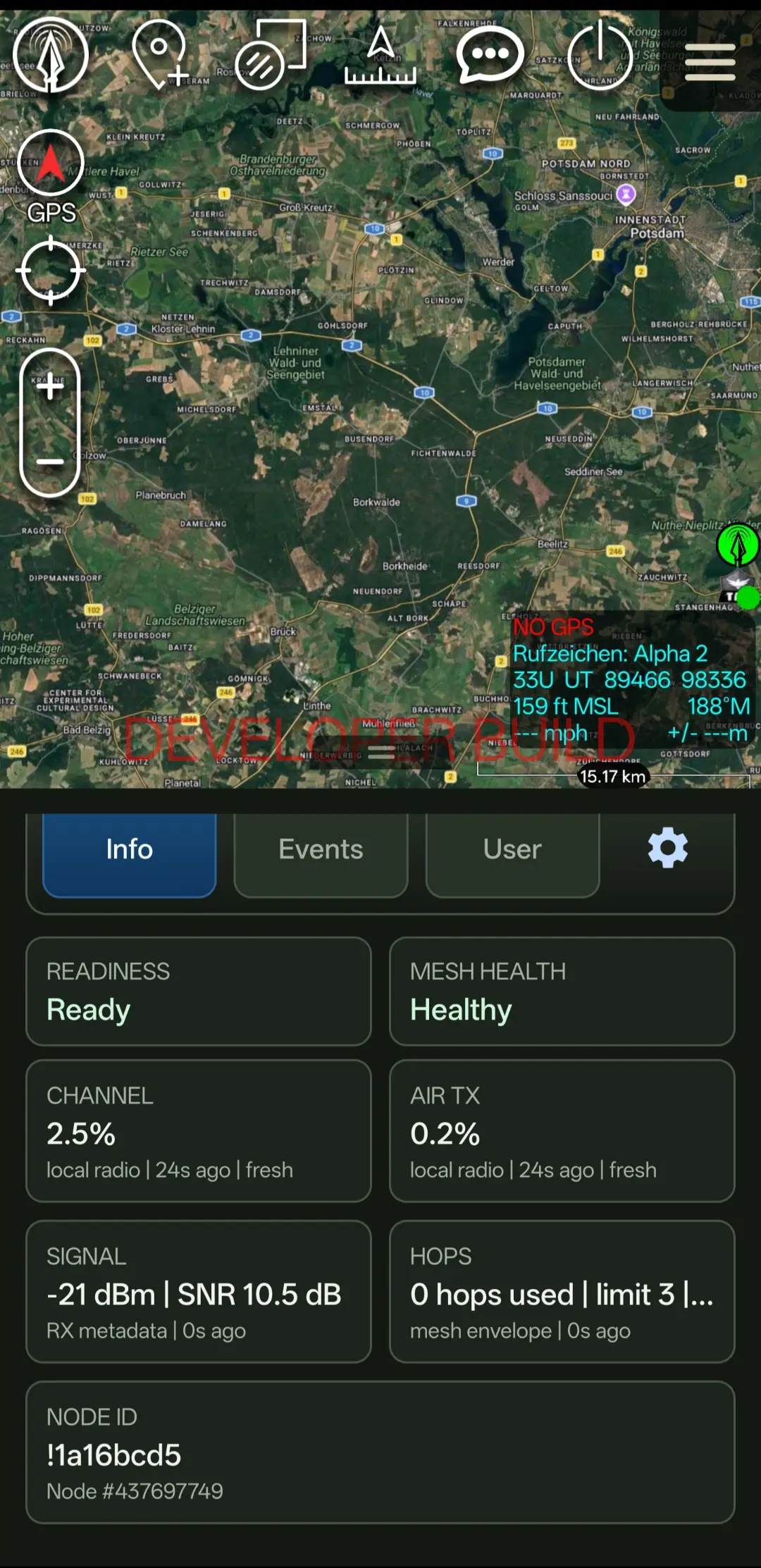
See signal, battery and link health at a glance — and let LANCE manage the radio over Bluetooth or USB. Presets configure the radio for you and verify it on connect, with full manual control available on Pro.
The node view reports RSSI, SNR, battery and hop distance for connected radios, plus the battery level of the connected radio itself — with a warning before it runs low. It's a deliberately honest read on link quality — so you know whether the mesh will carry your next send before you rely on it.
02
LANCE owns the radio template
For your selected operating mode, LANCE holds the effective radio configuration and writes it over BLE when the attached radio doesn't match. The link reports yellow while configuring and only turns green once the radio reads back the expected settings — including the channel encryption state.
Yellow vs greenYellow = configuring or mismatched. Green = the radio matches your mode and is verified. Give it a moment after connect or a preset change.
03
Operating presets, scaled to your edition
Free runs the single LANCE Free preset over Bluetooth. Paid builds add short-range, large-team, long-range and low-traffic presets, Manual mode for expert radio settings, and USB serial as an alternative transport. Enterprise adds centrally managed presets and curated device roles — including a tactical CLIENT_HIDDEN role.
04
Regions and encryption
Region selection follows Meshtastic's regulatory sub-GHz bands. Free exposes one common legal band per market; Pro unlocks alternate and SRD bands; Enterprise can use every supported region. A custom PSK / encryption profile is available from Pro upward, and diagnostics never store raw key material.
Pro onlyManual radio configuration, a custom PSK / encryption profile and Use Radio GPS require LANCE Pro.
05
Transmit power, within safe limits
Set the radio's transmit power with a slider in the LANCE panel — from 2 dBm up to Max. LANCE caps it at the lower of the radio's own hardware limit and the legal limit of your region, and confirms every change by reading the radio back. Available on every edition, for Meshtastic and MeshCore radios.
Tx Power Override (MeshCore)On MeshCore radios, an explicit override can lift the regional limit so the radio's full power can be used. LANCE still respects the radio's hardware maximum and warns you first — operating legally and safely is your responsibility.
06
Radio GPS as position source
If your radio has its own GPS, LANCE Pro can use it for your ATAK self marker and outgoing PLI. Choose the polling interval and the position details — standard (altitude, DOP, satellites and time) or vehicle, which adds heading and speed. Only fresh fixes are used.
07
MeshCore radios
Everything above also applies to MeshCore companion radios. LANCE detects them automatically, asks before configuring one, and sets up its own channel in a free slot. Settings MeshCore doesn't use — such as hop limit, device role and rebroadcast mode — are hidden while a MeshCore radio is active.
FAQ
Node status & radio, answered.
What counts as a usable signal?
It depends on terrain and preset, but RSSI down toward −112 dBm is roughly the usable floor for the tested baseline. Watch SNR alongside it — a positive SNR is a healthier indicator than RSSI alone.
Why does the link stay yellow?
Yellow means LANCE is still configuring or verifying the radio against your operating mode. If it persists, the radio config doesn't yet match — check it isn't locked to an old channel name.
Can I configure the radio manually?
Manual radio configuration is available on Pro and Enterprise. Free uses the managed LANCE Free preset, which keeps the radio correct without manual tuning.
Can LANCE use the radio's GPS?
Yes — on Pro and Enterprise. Turn on Use Radio GPS and fresh fixes from the radio's GPS drive your ATAK self marker and outgoing PLI. The polling interval and position details (standard, or vehicle with heading and speed) are selectable.
Can I change the transmit power?
Yes, on every edition. The slider in the LANCE panel goes from 2 dBm to Max, and LANCE never exceeds the radio's hardware limit or — unless you explicitly enable the MeshCore-only Tx Power Override — your region's legal limit. Each change is verified by readback.